
Verwandte Artikel zu Advanced Ludo Using Excel VBA: Zero-Object Interface:...
Advanced Ludo Using Excel VBA: Zero-Object Interface: Just Cells and VBA - Learn Game Logic by Building Ludo - Complete Code Included - Softcover
Inhaltsangabe
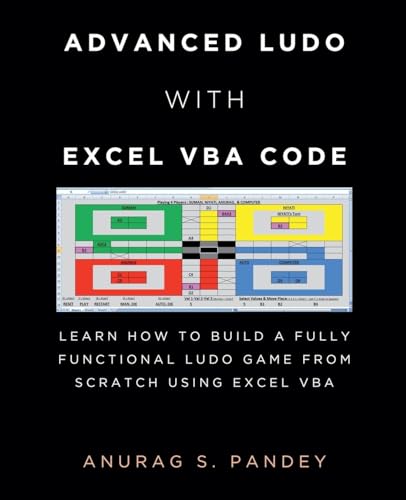
Build a Fully Functional Ludo Game in Microsoft Excel Using VBA Have you ever wondered whether you can create a complete, playable Ludo game directly inside Microsoft Excel? This book provides 1,800+ lines of VBA code and straightforward instructions for creating a fully functional Ludo game in an Excel worksheet. There is no need to manually draw the board or create the game interface. Copy the provided VBA code into the Excel VBA Code Editor, run the macro, and the Ludo board, layout, and game controls are automatically generated in the worksheet. What You Can Create The completed game includes:Human vs. Human gameplay Human vs. Computer gameplay Computer vs. Computer gameplay Rule-based computer-player logic Manual and automatic dice controls Multiple players and Ludo pieces Piece selection and movement Reset and restart controls Complete game and turn logic An interactive Ludo board generated directly by VBA A Zero-Object Interface One of the distinctive features of this Ludo project is its zero-object interface. The game does not require you to manually create Excel shapes, form controls, buttons, or other graphical objects to build the board and interface. Instead, VBA generates the game directly in the Excel worksheet, including the board layout and controls. This makes the project an interesting example of how VBA can transform a standard worksheet into an interactive game. Learn From a Complete VBA Project The book isn't just a collection of code. The complete project gives you an opportunity to explore how VBA can be used to implement game mechanics and programming logic. You can examine and experiment with:VBA programming Game and turn logic Dice and movement rules Player and piece management Computer-player decision logic Worksheet formatting through VBA Interactive controls Programming logic used to manage a playable board game Complete Code Included The book includes 1,800+ lines of VBA code used to create the Ludo game. The basic process is simple: Copy the code ¿ Paste it into the VBA Code Editor ¿ Run the macro ¿ Play the generated Ludo game. After creating the game, you can explore the code, experiment with its logic, and make your own modifications. Who Is This Book For? This practical VBA project can be useful for:Excel VBA learners Excel users interested in programming Beginners looking for a hands-on VBA project Programmers interested in game development Students exploring programming logic Anyone interested in creating a Ludo game in Excel If you want to explore what is possible with Excel VBA beyond traditional spreadsheets, this project gives you a practical way to build, examine, and play a complete Ludo game inside Excel. Build the game. Explore the code. Understand the logic. Play Ludo-all inside Microsoft Excel.
Die Inhaltsangabe kann sich auf eine andere Ausgabe dieses Titels beziehen.
Über die Autorin bzw. den Autor
Anurag S Pandey is a writer, poet and computer programmer. His poems have been published in national newspapers and magazines of India like Navbharat Times, Kadambini etc. He has written Story/ Screenplay/ Dialogues for various TV Shows like Lady Inspector, Shaka Laka Boom Boom, Indonesian TV shows etc. At present he lives in Bhubaneswar, India. Meditation, yoga, mystery, paranormal & supernatural activities are some of his favorite topics to read and write.
„Über diesen Titel“ kann sich auf eine andere Ausgabe dieses Titels beziehen.
Suchergebnisse für Advanced Ludo Using Excel VBA: Zero-Object Interface:...

Beispielbild für diese ISBN
UNKNOWN
ISBN 13: 9798230867968
Neu
Anbieter: GreatBookPrices, Columbia, MD, USA
Verkäuferbewertung 5 von 5 Sternen

Zustand: New. Bestandsnummer des Verkäufers 49782849-n
Neu kaufen
EUR 13,15
EUR 2,35 Versand
Versand innerhalb von USA
Versand innerhalb von USA
Anzahl: Mehr als 20 verfügbar
Beispielbild für diese ISBN
Advanced Ludo Using Excel VBA: Zero-Object Interface: Just Cells and VBA - Learn Game Logic by Building Ludo - Complete Code Included
Anbieter: California Books, Miami, FL, USA
Verkäuferbewertung 5 von 5 Sternen
Zustand: New. Bestandsnummer des Verkäufers I-9798230867968
Neu kaufen
EUR 15,58
Versand gratis
Versand innerhalb von USA
Versand innerhalb von USA
Anzahl: Mehr als 20 verfügbar
Beispielbild für diese ISBN
UNKNOWN
ISBN 13: 9798230867968
Gebraucht
Anbieter: GreatBookPrices, Columbia, MD, USA
Verkäuferbewertung 5 von 5 Sternen
Zustand: As New. Unread book in perfect condition. Bestandsnummer des Verkäufers 49782849
Gebraucht kaufen
EUR 15,05
EUR 2,35 Versand
Versand innerhalb von USA
Versand innerhalb von USA
Anzahl: Mehr als 20 verfügbar
Foto des Verkäufers
Advanced Ludo Using Excel VBA
Anbieter: Rarewaves.com USA, London, LONDO, Vereinigtes Königreich
Verkäuferbewertung 5 von 5 Sternen
Paperback. Zustand: New. Bestandsnummer des Verkäufers LU-9798230867968
Neu kaufen
EUR 17,45
Versand gratis
Versand von Vereinigtes Königreich nach USA
Versand von Vereinigtes Königreich nach USA
Anzahl: Mehr als 20 verfügbar
Beispielbild für diese ISBN
Advanced Ludo with Excel VBA Code Learn How to Build a Fully Functional Ludo Game from Scratch Using Excel VBA
Print-on-DemandAnbieter: PBShop.store US, Wood Dale, IL, USA
Verkäuferbewertung 5 von 5 Sternen
PAP. Zustand: New. New Book. Shipped from UK. THIS BOOK IS PRINTED ON DEMAND. Established seller since 2000. Bestandsnummer des Verkäufers L0-9798230867968
Neu kaufen
EUR 18,22
Versand gratis
Versand innerhalb von USA
Versand innerhalb von USA
Anzahl: Mehr als 20 verfügbar
Beispielbild für diese ISBN
Advanced Ludo with Excel VBA Code Learn How to Build a Fully Functional Ludo Game from Scratch Using Excel VBA
Print-on-DemandAnbieter: PBShop.store UK, Fairford, GLOS, Vereinigtes Königreich
Verkäuferbewertung 5 von 5 Sternen
PAP. Zustand: New. New Book. Delivered from our UK warehouse in 4 to 14 business days. THIS BOOK IS PRINTED ON DEMAND. Established seller since 2000. Bestandsnummer des Verkäufers L0-9798230867968
Neu kaufen
EUR 17,23
EUR 3,90 Versand
Versand von Vereinigtes Königreich nach USA
Versand von Vereinigtes Königreich nach USA
Anzahl: Mehr als 20 verfügbar
Beispielbild für diese ISBN
Advanced Ludo Using Excel VBA: Zero-Object Interface: Just Cells and VBA - Learn Game Logic by Building Ludo - Complete Code Included
Anbieter: Ria Christie Collections, Uxbridge, Vereinigtes Königreich
Verkäuferbewertung 5 von 5 Sternen
Zustand: New. In English. Bestandsnummer des Verkäufers ria9798230867968_new
Neu kaufen
EUR 17,72
EUR 11,11 Versand
Versand von Vereinigtes Königreich nach USA
Versand von Vereinigtes Königreich nach USA
Anzahl: Mehr als 20 verfügbar
Beispielbild für diese ISBN
UNKNOWN
ISBN 13: 9798230867968
Neu
Anbieter: GreatBookPricesUK, Woodford Green, Vereinigtes Königreich
Verkäuferbewertung 5 von 5 Sternen
Zustand: New. Bestandsnummer des Verkäufers 49782849-n
Neu kaufen
EUR 15,63
EUR 17,79 Versand
Versand von Vereinigtes Königreich nach USA
Versand von Vereinigtes Königreich nach USA
Anzahl: Mehr als 20 verfügbar
Beispielbild für diese ISBN
UNKNOWN
ISBN 13: 9798230867968
Gebraucht
Anbieter: GreatBookPricesUK, Woodford Green, Vereinigtes Königreich
Verkäuferbewertung 5 von 5 Sternen
Zustand: As New. Unread book in perfect condition. Bestandsnummer des Verkäufers 49782849
Gebraucht kaufen
EUR 18,47
EUR 17,79 Versand
Versand von Vereinigtes Königreich nach USA
Versand von Vereinigtes Königreich nach USA
Anzahl: Mehr als 20 verfügbar
Foto des Verkäufers
Advanced Ludo Using Excel VBA : Zero-Object Interface: Just Cells and VBA - Learn Game Logic by Building Ludo - Complete Code Included
Print-on-DemandAnbieter: AHA-BUCH GmbH, Einbeck, Deutschland
Verkäuferbewertung 5 von 5 Sternen
Taschenbuch. Zustand: Neu. nach der Bestellung gedruckt Neuware - Printed after ordering - Build a Fully Functional Ludo Game in Microsoft Excel Using VBAHave you ever wondered whether you can create a complete, playable Ludo game directly inside Microsoft Excel This book provides 1,800+ lines of VBA code and straightforward instructions for creating a fully functional Ludo game in an Excel worksheet.There is no need to manually draw the board or create the game interface. Copy the provided VBA code into the Excel VBA Code Editor, run the macro, and the Ludo board, layout, and game controls are automatically generated in the worksheet.What You Can CreateThe completed game includes:Human vs. Human gameplayHuman vs. Computer gameplayComputer vs. Computer gameplayRule-based computer-player logicManual and automatic dice controlsMultiple players and Ludo piecesPiece selection and movementReset and restart controlsComplete game and turn logicAn interactive Ludo board generated directly by VBAA Zero-Object InterfaceOne of the distinctive features of this Ludo project is its zero-object interface.The game does not require you to manually create Excel shapes, form controls, buttons, or other graphical objects to build the board and interface.Instead, VBA generates the game directly in the Excel worksheet, including the board layout and controls.This makes the project an interesting example of how VBA can transform a standard worksheet into an interactive game.Learn From a Complete VBA ProjectThe book isn't just a collection of code. The complete project gives you an opportunity to explore how VBA can be used to implement game mechanics and programming logic.You can examine and experiment with:VBA programmingGame and turn logicDice and movement rulesPlayer and piece managementComputer-player decision logicWorksheet formatting through VBAInteractive controlsProgramming logic used to manage a playable board gameComplete Code IncludedThe book includes 1,800+ lines of VBA code used to create the Ludo game.The basic process is simple:Copy the code ¿ Paste it into the VBA Code Editor ¿ Run the macro ¿ Play the generated Ludo game.After creating the game, you can explore the code, experiment with its logic, and make your own modifications.Who Is This Book For This practical VBA project can be useful for:Excel VBA learnersExcel users interested in programmingBeginners looking for a hands-on VBA projectProgrammers interested in game developmentStudents exploring programming logicAnyone interested in creating a Ludo game in ExcelIf you want to explore what is possible with Excel VBA beyond traditional spreadsheets, this project gives you a practical way to build, examine, and play a complete Ludo game inside Excel.Build the game. Explore the code. Understand the logic. Play Ludo-all inside Microsoft Excel. Bestandsnummer des Verkäufers 9798230867968
Neu kaufen
EUR 22,67
EUR 35,00 Versand
Versand von Deutschland nach USA
Versand von Deutschland nach USA
Anzahl: 2 verfügbar